Guides
How to Send a Group Text Without a Group Chat on iPhone
Yes, you can send a group text without creating a group chat on iPhone. Use BCC Text with the Messages app to send individual, private texts to multiple people at once. Each recipient gets a personal message as if you typed it just for them, with no shared thread or visible phone numbers.
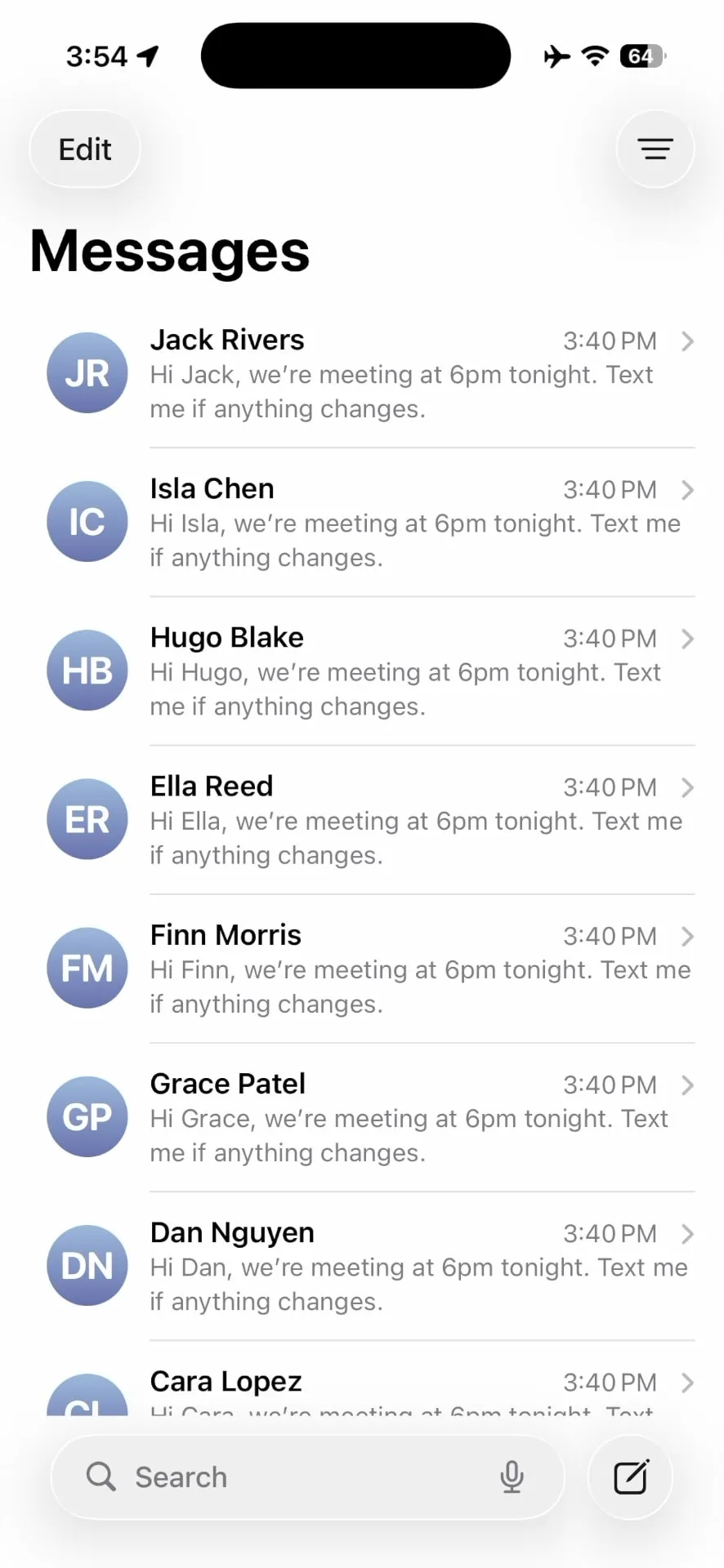

Sending a quick update to multiple people on your iPhone sounds simple until your group chat explodes with replies. Someone responds "who is this," another person leaves the thread, and suddenly your phone is buzzing nonstop with notifications that have nothing to do with you.
If you've ever wished you could send a mass text without the chaos of a group chat, you're not alone. Coaches, small business owners, teachers, event organizers, and team leaders face this problem daily. This guide will show you exactly how BCC Text solves it.
The problem with traditional group texts
Group chats work well for small, ongoing conversations among friends. They fall apart quickly when you need to send one-way announcements or updates to people who don't know each other.
Why group chats fail for mass messaging
When you add everyone to a single thread, several problems emerge immediately:
- Every reply goes to everyone – A simple "thanks" from one person notifies 20+ others
- Phone numbers are exposed – All recipients can see each other's contact information
- Conversations become noisy – Unrelated side discussions derail your original message
- Privacy concerns arise – Clients or customers may not want their numbers shared
- People leave the thread – Recipients who don't want notifications simply exit, missing future updates
For coaches sending practice changes, small businesses sharing appointment reminders, teachers updating parents, or event hosts confirming details, these issues make group texts unusable.
What is BCC Text?
BCC Text is an iPhone app that sends a single message to multiple people while keeping each conversation private and separate. Think of it as the "BCC" function from email, applied to text messaging.
The app works with your existing messaging apps:
- Messages (Apple's built-in app)
- Google Voice (via Shortcuts)
- WhatsApp (via Shortcuts)
You write your message once, select your recipients, and BCC Text delivers individual texts so every conversation stays one-on-one. Recipients never see who else received the message.
How BCC Text works on iPhone: Step-by-step
Here's the complete workflow for sending a group text without creating a group chat:
Step 1: Choose your recipients
Open BCC Text and select who should receive your message. You have several options:
- Select individual contacts from your phone
- Use saved groups (Clients, Teams, Classes, Event Attendees)
- Import contacts from a CSV file
- Mix recipients across different messaging apps
BCC Text lets you assign each person to their preferred app. For example, you might send to 20 people via Messages, 5 via Google Voice, and 3 via WhatsApp—all from the same interface.
Step 2: Write and personalize your message
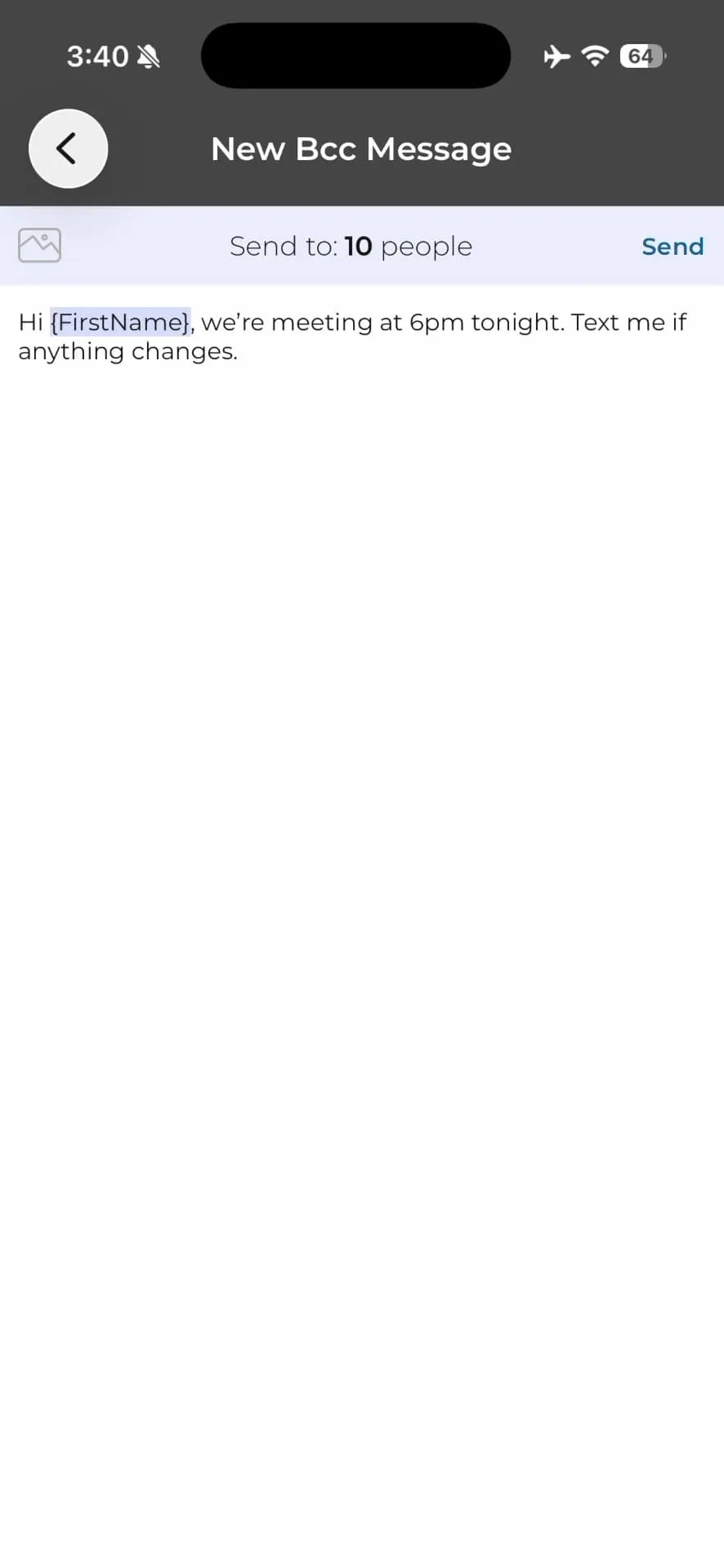
Type your message once in the BCC Text composer. The app supports personalization tokens that make each message feel individually crafted:
Hi {FirstName}, we are meeting at 6pm tonight. Text me if anything changes.
This becomes: "Hi Sarah, we're meeting at 6pm tonight. Text me if anything changes." BCC Text previews exactly who will receive the message and which app will deliver it before you send.
Step 3: Send with one tap
When you're ready, tap send. BCC Text triggers Apple Shortcuts to deliver your message through the correct app for each recipient.
On the recipient's phone, they see a normal message from you in a regular one-on-one thread. They have no indication that other people received the same message. There's no group chat indicator, no shared thread, and no visible recipient list.
BCC Text vs traditional group chat
| Feature | BCC Text | Group Chat |
|---|---|---|
| Privacy | Each recipient gets a private message | Everyone sees all phone numbers |
| Replies | Go only to you | Go to everyone in the thread |
| Notifications | Recipients control their own thread | Everyone gets notified of every reply |
| Recipient awareness | No one knows who else received the message | Everyone sees the full recipient list |
| Professional appearance | Personal, one-on-one conversation | Impersonal mass message |
| Thread management | Clean, individual conversations | Single noisy thread |
| Personalization | Name tokens and custom fields | No personalization options |
Why this method is better than group chats
Using BCC Text with the Messages app gives you several advantages over traditional group texting:
Recipients don't see each other's phone numbers. There's no shared thread exposing everyone's contact information. This matters significantly when texting clients, customers, or people who don't know each other.
People can reply directly to you if needed without spamming everyone else. A simple "sounds good" stays between you and that person, not 30 other people.
A private message feels personal and intentional. Being thrown into a group chat with strangers feels impersonal and sometimes invasive.
You can mix Messages, Google Voice, and WhatsApp recipients in the same blast. This flexibility is nearly impossible to manage manually while keeping conversations private.
Instead of copying and pasting the same message into 20+ individual threads, you compose once and send to everyone. BCC Text handles the repetitive work while maintaining the personal touch.
Common use cases for private mass texting
Real BCC Text users rely on private group texting for these scenarios:
Send last-minute practice changes, game schedule updates, and weather cancellations to parents without creating notification chaos.
Share quick promos, appointment reminders, and holiday hours to their customer list while keeping each conversation personal.
Update parents about classroom events, field trips, and schedule changes without exposing family contact information.
Distribute event details, location changes, and meeting reminders to members who may not all know each other.
Send day-of reminders, parking instructions, and last-minute updates to attendees without creating a messy group thread.
Notify multiple clients about open houses, new listings, and market updates while maintaining professional individual relationships.
In every case, the sender needs to reach many people quickly but doesn't want—or need—a group conversation.
Is BCC Text private and secure?
BCC Text prioritizes privacy by design. Here's how your data stays protected:
BCC Text operates as a productivity layer on top of apps you already use and trust, rather than replacing them with a proprietary messaging system.
Getting started with BCC Text
If you're tired of messy group chats but still need to reach multiple people at once, BCC Text offers a straightforward solution.
The app is free to download with 3 free messages to test the functionality. After that, unlock unlimited messages with a one-time lifetime purchase of $45 or subscription options starting at $3/month.
To send your first private mass text:
- Download BCC Text from the App Store
- Grant contact permissions
- Create your first group or select individual contacts
- Compose your message with optional personalization
- Send with one tap
Your recipients get clean, private conversations. You get your time and sanity back.